If you encounter a 500 Internal Server Error when running your script for the first time, it usually indicates a misconfiguration on your hosting environment. This error is commonly related to PHP compatibility or missing server modules.
Follow these steps to resolve the issue:
Step 1: Access your Hosting Control Panel
-
Log in to cPanel (or use the equivalent control panel provided by your hosting provider).
-
Locate the option “Select PHP Version” or “PHP Configuration”.

Your Hosting > CPanel > Select PHP Version
Step 2: Set the Correct PHP Version
-
Change the PHP version to any supported release between PHP 7.1 and PHP 7.4.
-
Ensure that you apply and save the changes.

Your Hosting > CPanel > Current PHP version
Technical Note:
The script is optimized to run on PHP 7.1–7.4. Running it on unsupported versions (e.g., PHP 5.x, PHP 8.x) may trigger fatal errors due to deprecated or incompatible functions. If the error persists after adjusting the PHP version.
To confirm your hosting environment meets the required configuration:
-
Open the following URL in your browser:
your-domain.com/info.php
This diagnostic file will display whether the correct PHP version and required extensions are enabled.
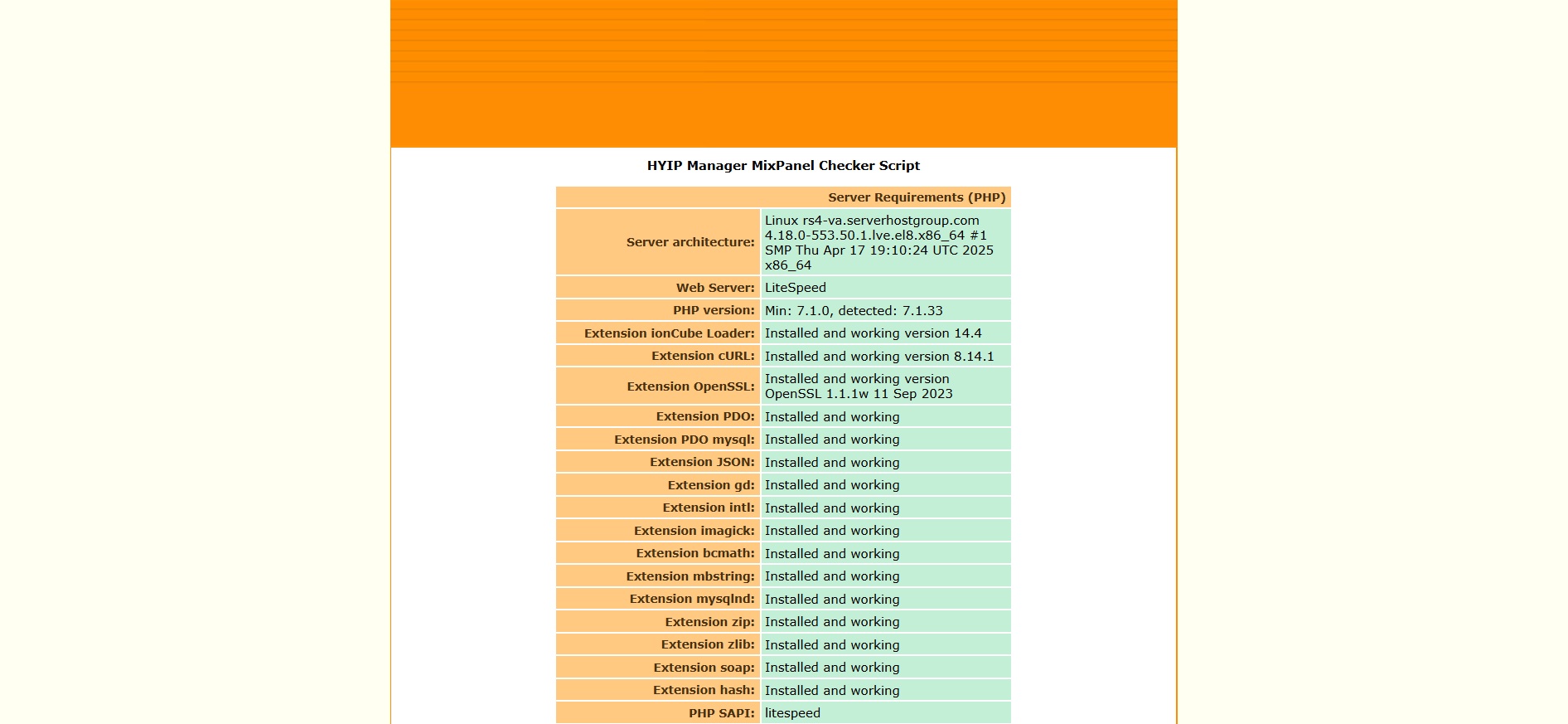
Your Hosting > info.php
Step 3: If the Error Persists
-
Check your hosting error logs for additional details.
-
Verify that file permissions are correctly set (
755for directories,644for files). -
Contact your hosting provider if you cannot enable the required PHP extensions.

Your Hosting > File Manager


